함수 호출
함수 호출은 모델이 작성된 코드나 외부 서비스와 인터페이스할 수 있는 유연한 방법을 제공합니다.
개요
함수 호출을 통해 개발자가 직접 작성한 함수 실행 결과를 모델이 참조할 수 있습니다. ①시스템 프롬프트와 메시지를 기반으로 ②모델은 텍스트를 생성하는 대신(또는 생성하는 것과 더불어) 주어진 함수를 호출할 지 결정할 수 있습니다.
③함수를 호출하여 전달받은 결과값을 구한 후 ④원래 메시지와 함께 전달하면 ⑤모델이 최종 결과를 반환합니다.
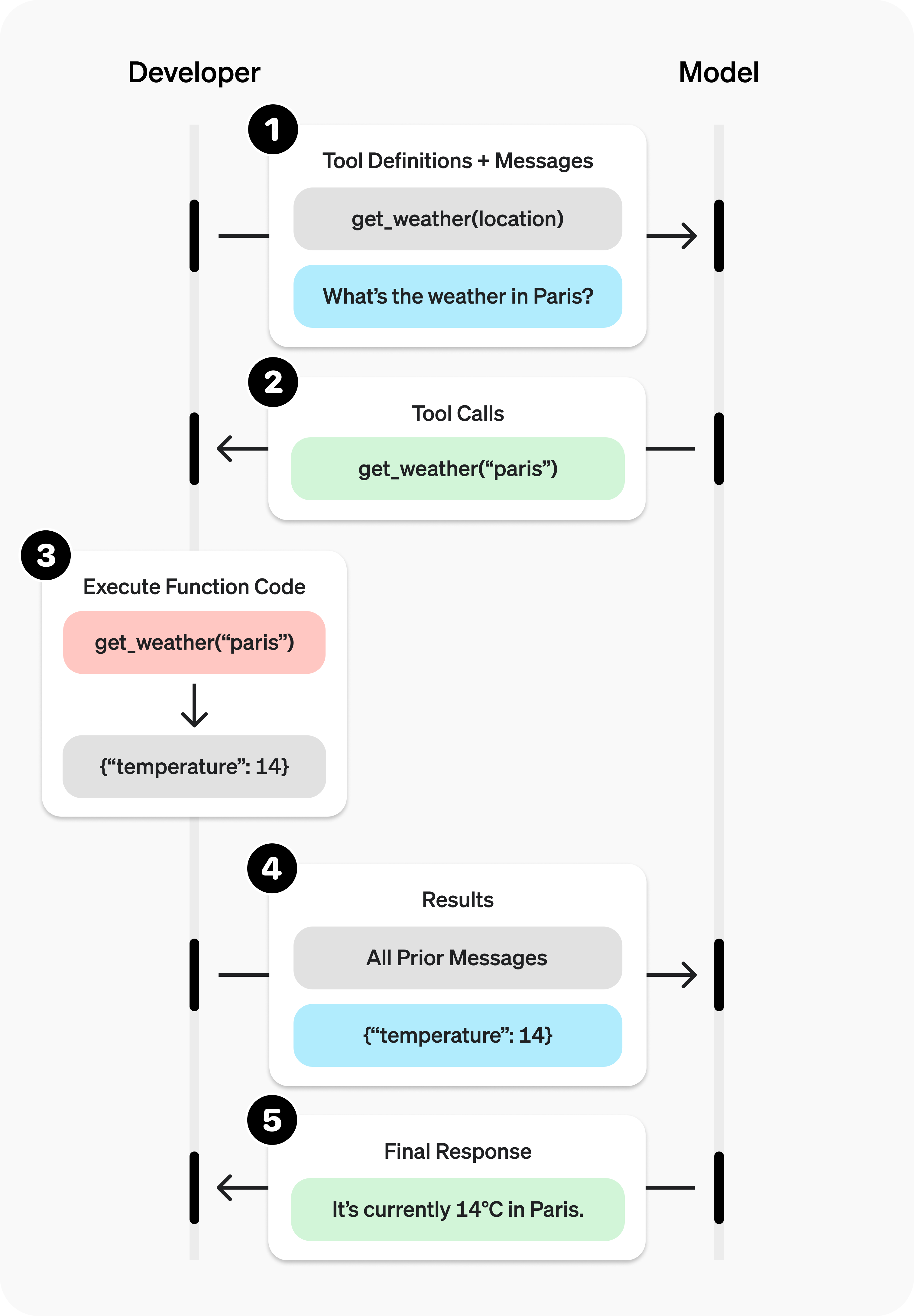
함수 호출은 크게 아래와 같은 두 가지 용도로 활용할 수 있습니다.
-
데이터 가져오기
- 최신 정보를 검색하여 모델이 답변 시 참조할 수 있게 합니다. (RAG)
- API를 호출하여 날씨, 주가, 환율 등 실시간 데이터를 검색할 수 있습니다.
- 데이터베이스와 상호 작용하여 특정 데이터를 가져올 수 있습니다.
-
액션 실행하기
- 워크플로나 자동화 도구를 트리거할 수 있습니다.
- 코드를 생성하고 함수 호출을 사용하여 즉시 실행할 수 있습니다.
- 양식을 작성하고 제출할 수 있습니다.
함수 예시
모델이 아래와 같이 정의된 get_weather 함수를 사용하는 예제를 단계 별로 살펴보겠습니다.
import requests
def get_weather(latitude, longitude):
response = requests.get(f"https://api.open-meteo.com/v1/forecast?latitude={latitude}&longitude={longitude}¤t=temperature_2m,wind_speed_10m&hourly=temperature_2m,relative_humidity_2m,wind_speed_10m")
data = response.json()
return data['current']['temperature_2m']
이전 다이어그램과 달리, 이 함수는 매개변수로 위치 대신 위도와 경도를 요구합니다. (Konan LLM 모델은 여러 위치로부터 위도와 경도를 자동으로 결정할 수 있습니다!)
함수 호출 절차
① 함수 정의와 함께 모델을 호출합니다.
from openai import OpenAI
import json

client = OpenAI(base_url="http://127.0.0.1:38090/v3", api_key="test")

tools = [{
    "type": "function",
    "function": {
        "name": "get_weather",
        "description": "Get current temperature for provided coordinates in celsius.",
        "parameters": {
            "type": "object",
            "properties": {
                "latitude": {"type": "number"},
                "longitude": {"type": "number"}
            },
            "required": ["latitude", "longitude"],
            "additionalProperties": False
        },
        "strict": True
    }
}]

messages = [{"role": "user", "content": "오늘 서울의 날씨는 어떤가요?"}]

completion = client.chat.completions.create(
    model="Konan-LLM-ENT-11",
    messages=messages,
    tools=tools,
)

print(completion.choices[0].message.tool_calls[0])
② 모델이 함수를 호출할 지 검사합니다.
{
    "id": "chatcmpl-tool-9e267ff4d35140eda4dc1c361ac120b0",
    "type": "function",
    "function": {
        "name": "get_weather",
        "arguments": "{\"latitude\": 37.5665, \"longitude\": 126.9780}"
    }
}
③ 함수를 호출합니다.
tool_call = completion.choices[0].message.tool_calls[0]
args = json.loads(tool_call.function.arguments)

result = get_weather(args["latitude"], args["longitude"])
④ 모델에 함수 호출 결과를 원래 메시지와 함께 전달합니다.
messages.append(completion.choices[0].message)  # append model's function call message
messages.append({                               # append result message
    "role": "tool",
    "tool_call_id": tool_call.id,
    "content": str(result)
})

completion_2 = client.chat.completions.create(
    model="Konan-LLM-ENT-11",
    messages=messages,
    tools=tools,
)

print(completion_2.choices[0].message.content)
⑤ 모델이 함수 호출 결과를 출력에 통합하여 반환합니다.
현재 서울 기온은 11°C 입니다.
함수 정의
함수는 completions API의 매개변수 tools의 배열요소들 중 function 타입 배열요소의 function 객체로 설정합니다.
| 필드 | 설명 |
|---|---|
| name | 함수명 (예. get_weather) |
| description | 언제, 어떻게 이 함수를 사용할 지에 대한 상세 설명 |
| parameters | 함수의 입력 파라미터들에 대한 JSON 스키마 |
| strict | 함수 호출 시 strict 모드 사용 여부, True로 설정 권장 |
함수 정의 시 주의 사항
- 함수명, 함수 설명, 매개변수 설명, 시스템 프롬프트를 통한 지침을 명확하고 자세하게 작성합니다.
- 가능한 코드를 사용하여 모델의 부담을 덜어냅니다.
- 정확도를 높이기 위해 함수 개수를 작게 유지합니다.